Is Your Legacy Digital Product Ready for the Agentic AI Era?
The most expensive mistake a business can make right now is assuming that agentic AI requires starting over.
It does not. Your existing digital product- the ERP your team built five years ago, the logistics platform running your warehouse operations, the customer portal that went live before AI was a board-level conversation does not need to be replaced. It needs to be made compatible. There is a meaningful difference between the two, and understanding it separates businesses that move quickly into agentic AI from those that spend years in platform-replacement debates before taking any real action.
The urgency is real. According to a 2026 legacy modernization report, 85% of enterprises say legacy systems are the primary barrier blocking AI adoption. Those same systems consume roughly 80% of IT budgets while still running mission-critical operations.
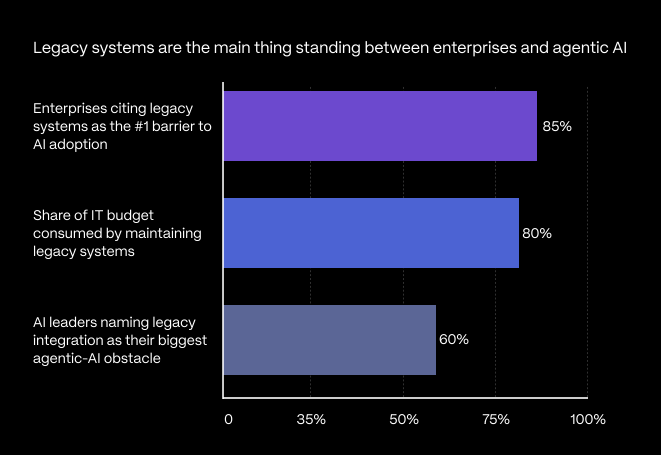
Sources: 2026 legacy modernization report, Deloitte, 2025. Figures should be re-verified against the original reports before publishing.
Why Legacy Digital Products Are Not Agentic AI-Ready by Default
Legacy products were designed to record and process transactions reliably — and they do that job well, which is why they are still running. They were not designed to expose data to AI agents in real time, respond to API calls from orchestration frameworks, or handle the high-frequency structured data access that agentic workflows require.
Three gaps appear consistently when businesses try to add agentic AI to zexisting products:
- Data is stored but not accessible: Years of valuable operational data sit inside a schema built for the product’s internal logic, not for external AI consumption — with either no API layer or an incomplete, undocumented one.
- Data is inconsistent across the product. The same customer under two IDs, product codes in three formats, status fields using different values to mean the same thing. A human navigates this intuitively; an AI agent processing at scale cannot.
- Business logic is embedded and undocumented. Approval workflows and exception rules layered in over years by developers who may have moved on. Extracting that logic is a prerequisite for telling an agent what it may do and when to escalate.
None of these are reasons to abandon the product. They are a scoped, addressable to-do list and working through it in the right order is what makes integration achievable without replacement.
Replace vs. make compatible — at a glance
| Factor | Rip & Replace | Make Compatible |
|---|---|---|
| Timeline | 12–36 months of platform debate + rebuild | 10–16 weeks to first production workflow |
| Operational data | Migrated and re-validated from scratch | Retained — years of history stay in place |
| Business logic | Re-implemented, often with gaps | Preserved and documented, not rebuilt |
| User adoption | Re-training on a new interface | Familiar product keeps running as-is |
| Risk profile | High — big-bang cutover | Low — additive, workflow by workflow |
The 4-Step Path to Agentic AI Compatibility
The sequence matters as much as the steps. Each one depends on the one before it — which is exactly why skipping ahead is where most integration projects quietly fail.
| Step | What happens | Why it matters | Output |
|---|---|---|---|
| 1.Data | Clean and normalize the fields each workflow will use | Agents decide entirely on the data they read | A maintained data-quality pipeline |
| 2. API layer | Wrap existing functionality in a documented interface | Agents read data and trigger actions through it | Versioned API on top of the core |
| 3. Boundaries | Define the agent’s task and its escalation rules | Builds trust so scope can safely expand | Scoped task + escalation triggers |
| 4. Deploy | Connect through orchestration with logging on | Visibility turns pilots into scalable systems | Monitored live workflow |
Step 1: Start With Data — Because Agentic AI Has Nothing Else to Work With
This is the step that gets compressed or skipped in almost every failed AI integration project — and it is the one most directly responsible for whether a deployment delivers reliable value or quietly gets shut down six months after launch. Two distinct processes live here, and the difference matters for scoping.
Data cleaning is not simply a pre-launch exercise; it is a core requirement for reliable enterprise AI. Data cleaning in enterprise AI helps organizations establish the data quality foundation required for accurate AI outputs and scalable automation.
Data normalization is structurally different. It restructures how data is organized so the same concept is represented consistently and without redundancy across the whole system. A customer ID in one module should be that same customer ID everywhere; product codes should follow one format; status fields should use consistent values regardless of which team populated them.
A practical diagnostic: ask your team for a reliable count of unique active customers and open orders across your most important tables — without manually correcting the result afterward. If that needs reconciliation, an AI agent will hit the same problem at scale, and every inconsistency becomes a wrong decision multiplied across every process it touches.
Define the fields each workflow requires, establish what “clean and normalized” means for each, and build the pipeline that maintains it continuously. This foundation determines whether the deployment succeeds in production.
Step 2: Build the API Layer That Connects Your Product to the Agent
Once the data foundation is in place, the product needs to expose it through a structured interface the agent can call reliably. Agentic systems interact with business applications through APIs — reading data, triggering actions, receiving structured confirmations, and logging every step for audit.
If your product was not built API-first, this means adding a layer between the agent and the existing database and logic. Crucially, it does not require modifying the core — it wraps the functionality you want the agent to reach in a clean, versioned, documented interface covering three things: reading and querying current records, triggering workflow actions such as approvals and status changes, and returning confirmations the agent can interpret and act on.
At Technostacks, we build this layer using FastAPI or custom REST architecture, connecting directly to the existing infrastructure without touching the core application. The product keeps operating exactly as it always has; the AI layer reaches it through the interface, and that interface extends independently as the agent’s scope grows.
Step 3: Define What the Agent Can Do — and Where It Must Stop
Before the first deployment, define the workflow the agent will own at the task level. Not “automate customer service,” but: “classify inbound support requests by issue type, check the customer’s order history, generate a case summary, and route to the correct team queue.”
Alongside it, define escalation conditions — the exact situations where the agent stops and flags for human review: data-quality issues it cannot resolve, requests matching conflicting rules, account statuses that need human judgment. Setting these triggers before launch is not a sign of AI limitation; it is how production deployments earn the organizational trust that lets scope expand over time.
Step 4: Deploy With Monitoring in Place From Day One
With clean data, an API layer, and defined boundaries in place, the agent connects to the live environment through an orchestration layer that manages goal decomposition, tool use, and decision logging. This is where your choice of agentic AI frameworks matters; the framework coordinates how the agent breaks a goal into steps, calls your API, and records each decision. For enterprises building production-grade Agentic AI applications, cloud architecture also plays a critical role in scalability, security, and observability. AWS consulting for Agentic SaaS solutions can help align the cloud foundation with measurable business outcomes.
The first deployment will surface edge cases the design did not anticipate. That is normal. The iteration cycle analyzing those cases, refining workflow definitions, and improving data quality in specific fields is what moves a careful pilot into a reliable, scalable system.
What This Means for Businesses Running Existing Digital Products
The businesses capturing the most agentic AI value are not the ones that made the largest platform-replacement investments. They are the ones that made targeted, intelligent decisions about where to add AI capability to products that already work as in this multi-agent enterprise solution we delivered.
Your existing product carries real embedded value: years of operational data, business logic that reflects how your processes actually run, and user familiarity that takes considerable time to rebuild elsewhere. A well-executed compatibility upgrade uses all of it turning static data into active decision support and manual coordination into automated agent workflows.
Before modernizing an existing product, organizations should first evaluate their overall AI readiness, including data quality, API connectivity, process maturity, and governance. Our guide to assessing organizational readiness for the Agentic AI era provides a practical framework for identifying these gaps.
Technostacks works with businesses across manufacturing, logistics, healthcare, and technology to assess legacy products for agentic AI compatibility and build the data pipeline, API layer, workflow definitions, and orchestration that make deployment possible without replacing what already works.
Conclusion
Agentic AI readiness is not a rebuild decision; it is a sequencing decision. The systems already running your operations hold the data, the logic, and the user trust that make agents useful in the first place. What stands between them and production is a defined order of work: clean and normalize the data, expose it through a documented API, set clear boundaries for the agent, and deploy with monitoring from day one. Handled in that sequence, one workflow can reach production in weeks rather than the years a platform replacement demands — and each workflow you add compounds the value of what you have already built.
Start with one workflow, not a rebuild.
Ready for Agentic AI?
See how AI can move your planning from the warehouse whiteboard to real-time, revenue-driven intelligence.
Explore Data & AI
Frequently Asked Questions
1. Do you need to replace legacy software to use agentic AI?
No. In most cases, the existing system stays the system of record. AI capability is added through a data normalization layer and an API built on top — the core codebase isn’t modified.
2. What is the difference between data cleaning and data normalization?
Cleaning fixes the content of individual records (duplicates, gaps, bad formatting). Normalization fixes the structure so the same concept is represented consistently across every module. An agent needs both before it can read your data reliably.
3. How does agentic AI integrate with a legacy system that has no API?
You add an API layer that wraHigh-volume, rule-based, data-rich workflows with clear success metrics: request classification and routing, purchase-order validation, document extraction, inventory monitoring, and financial exception flagging.ps existing functionality in a clean, versioned interface reading records, triggering actions, returning confirmations without touching the core application. Frameworks like FastAPI or custom REST sit between the agent and your existing database.
4. Which business workflows are best suited for agentic AI automation?
High-volume, rule-based, data-rich workflows with clear success metrics: request classification and routing, purchase-order validation, document extraction, inventory monitoring, and financial exception flagging.
5. How long does it take to make a legacy system agentic AI-ready?
A focused single-workflow engagement — assessment, normalization, API layer, and agent integration — typically runs 10 to 16 weeks to first production. Multi-workflow programs are phased from there.