

Real Estate Land Management ERP: Acquisition to Project Readiness
A real estate project doesn’t begin when construction starts. It begins much earlier with identifying the right land, evaluating its development potential, completing legal due diligence, securing approvals, and converting that opportunity into a structured project.
A real estate land management ERP connects those early stages land, development agreements, legal checks, and statutory approvals to the projects, towers, and units that follow, so the information created at acquisition becomes the foundation for the entire development lifecycle instead of being lost in spreadsheets.
The logic of the business is a chain: land shapes the project, the project creates towers and units, units become inventory, inventory becomes sales, and sales create customer and financial obligations. Modern real estate businesses need to connect land, approvals, projects, and property inventory rather than managing each stage in isolation.
Why the Real Estate Development Lifecycle Needs to Be Connected
Many organizations manage land records, legal documents, approvals, project information and property inventory in different systems or spreadsheets. That creates a gap between two questions that should be linked:
- “Can we develop this land?” — the acquisition, legal and approval view.
- “What exactly are we developing?” — the project, tower and unit view.
A connected digital operating model preserves the relationship between these stages across the full journey:

Start with a Structured Land Bank
A developer may evaluate or control multiple land parcels at different stages. A land management system should maintain a structured land bank that captures each parcel’s key attributes:
- Land parcel and location
- Area and zoning
- Acquisition type and ownership
- Cost
- Development potential
- Title status and current legal status
- Approval status
Different acquisition models outright purchase, joint development or other arrangements, should also be distinguished. Together this creates visibility into the development pipeline before individual projects are ever created.
Manage Joint Development Agreements and Commercial Relationships
Joint Development Agreements (JDAs) add another layer of complexity. The organization typically needs to track landowner and developer details, share percentages, agreement and negotiation status, commercial terms, supporting documents, and legal obligations.
The important principle is that a JDA should never become an isolated document. Its commercial and legal information must stay connected to the land parcel and, eventually, to the project created from it.
Make Legal Due Diligence Part of the Workflow
Land acquisition involves significant legal verification. A structured due-diligence process usually covers:
- Title search and encumbrance verification
- Litigation and dispute checks
- Survey verification and tax records
- Ownership documents and legal opinions
Instead of a checklist in one spreadsheet and documents in separate folders, the ERP maintains the status of each verification against the underlying land parcel giving a clear answer to a single question: is this land actually ready to move forward?
Track Statutory Approvals: RERA, Fire, Environmental and More
Development projects depend on multiple approvals, which may include RERA registration, fire approvals, environmental clearance, building plan approval, completion certification and occupancy-related permissions. Storing the documents isn’t enough. The system should understand:
- What approval is required, and who is responsible
- When it was submitted and its current status
- What is still pending
- What is blocking project readiness
- This turns approval management into an operational workflow rather than a document repository, the same shift toward workflow automation that connected systems bring to every stage.
Turn Approved Land into a Structured Project
Once a development opportunity is ready, the next step is creating the project structure. A useful hierarchy is:

This is where land and project information become operationally connected. The project inherits the relevant development context while establishing the structure that Construction, Sales, Finance, and Customer Management rely on so teams never have to recreate information that already exists in the development process.
Build the Property and Unit Structure
For a property developer, the unit is one of the most important business records. A single unit can carry its project, tower, floor, configuration, area, pricing, availability, construction status, customer, payment plan, and booking, registration, and possession status.
The unit then moves through a clear lifecycle, connected to construction stages, BOQ, quality, site diary, and payment policies:

Why Property Unit Inventory Is Different from Normal Inventory
A construction ERP holds conventional inventory such as cement, steel, tiles or electrical materials. A flat, villa, office or plot is fundamentally different; it is not a simple stock item, and it needs its own business model.
| Dimension | Conventional inventory | Property unit |
|---|---|---|
| Identity | Interchangeable stock item | Unique asset with a physical location |
| Value | Cost and consumption | Commercial sale value |
| Ownership | Held as warehouse stock | Assigned to a specific customer |
| Documentation | Delivery / GRN records | Legal agreements and registration |
| Lifecycle | Purchase → issue → consume | Available → Reserved → Booked → Sold → Possession |
| Obligations | None after issue | Payment plans, possession, post-sale service |
Connect Project Readiness with Sales Readiness
A project can exist in the system long before all its units are ready to sell. To offer the right inventory, the organization needs to know at any moment:
- Which towers are active
- Which units are configured, available or blocked
- Which units are under construction
- Which units are ready for booking
- Which approvals are still pending
Connecting development, project and unit information gives Sales a reliable view of what can actually be offered to customers.
Keep the Data Connected Across the Entire Lifecycle
The real value comes from preserving these relationships after project setup. For any single unit, the chain should stay intact from land to service:
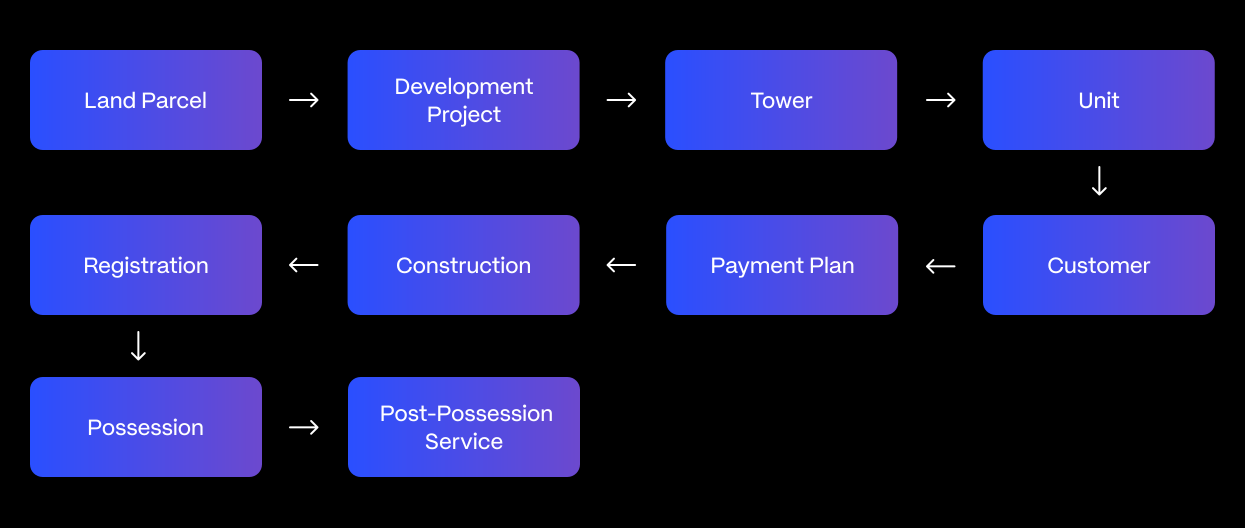
The unit becomes the bridge between multiple departments, which is exactly why the initial development data structure matters so much.
What Happens When These Processes Stay Separate?
When land, legal, project and unit information are disconnected, the problem is rarely one missing feature it’s the missing relationship between processes. The difference shows up across day-to-day operations:
| Area | Disconnected spreadsheets & silos | Connected Real Estate ERP |
|---|---|---|
| Data entry | Duplicated across teams | Entered once, reused downstream |
| Approvals | Documents sit in folders | Tracked as workflow with owners & status |
| Project readiness | Unclear and hard to verify | Visible in real time |
| Inventory status | Often incorrect | Accurate, unit-level status |
| Dev-to-sales handoff | Communication gaps | Shared project and unit reference |
| Management visibility | Fragmented spreadsheets | Portfolio-level dashboard |
Building a Connected Development Workflow
A modern real estate platform should let the business move through a controlled lifecycle, with each stage feeding the next:
- Stage 1 — Land: identify and evaluate the development opportunity.
- Stage 2 — Legal: complete due diligence and establish legal readiness.
- Stage 3 — Approvals: track statutory and regulatory requirements.
- Stage 4 — Project: convert the approved development into a structured project.
- Stage 5 — Units: create the tower, floor and unit hierarchy.
- Stage 6 — Readiness: make relevant units available for construction and commercial operations.
The result is a clean transition from development opportunity to operational project.
What Management Should Be Able to See
A management dashboard should turn all of this into a portfolio view rather than a collection of spreadsheets, answering questions such as:
- How many land parcels are under evaluation, and which are legally ready
- Which approvals are pending
- Which projects are ready to start, and which are under development
- How many units are available, reserved or booked
- Which projects carry approval or development risks
How Technostacks Approaches Real Estate ERP
At Technostacks, we start with the business lifecycle rather than a software module. For real estate organizations, that means understanding how land becomes a project, projects become units, and units become customers, and how those relationships eventually connect with construction, finance, and service.
The technology architecture is then designed around those relationships. This approach helps organizations avoid disconnected systems and build an ERP environment that reflects how their development business actually operates the same connected, workflow-first thinking we bring to agentic AI in enterprise workflows.
Conclusion
The real estate development lifecycle starts long before a customer books a property it starts with land. A connected Real Estate ERP carries that information through legal verification, statutory approvals, project creation and unit management, tying land acquisition, development agreements, due diligence, the tower-and-unit structure and property inventory into a single lifecycle. The guiding principle is simple: land information shouldn’t stop at acquisition; it should become the foundation for the project and property lifecycle that follows. Connect these stages, and the organization gains a clear view of what it owns, what it can develop, what’s ready, what’s pending, and what comes next.
If you’re planning or modernizing a real estate ERP, see how we’ve connected systems around a full business lifecycle in a multi-system enterprise solution we delivered, or get in touch with the Technostacks team to map your land-to-possession lifecycle and design a system around how your development business actually works.
FAQ
1. What is a real estate land management ERP?
A real estate ERP manages land acquisition, ownership, approvals, development agreements, and project data in one connected system.
2. Why should land and project management be connected in a real estate ERP?
It connects land acquisition, approvals, development, sales, and finance, reducing duplicate data and improving visibility.
3. How is property unit inventory different from normal inventory?
Property units such as flats, villas, offices, and plots require tracking of location, ownership, legal status, construction, value, and possession.
4. Can a real estate ERP track statutory approvals like RERA?
Yes. It can track RERA, fire, environmental, building, and occupancy approvals, including status, deadlines, and responsible teams.
5. What is the project–tower–floor–unit hierarchy in real estate ERP?
It structures a development from project to tower, floor, and unit, creating a common reference for construction, sales, finance, and possession.
6. How does a connected real estate ERP help sales teams?
It provides real-time unit availability and status, helping sales teams accurately identify available, reserved, booked, and blocked properties.